

Epson Scan 2 Linux Scanner Software Review & Guide
An in-depth review of Epson Scan 2 Linux scanner software. Learn how to configure your Epson hardware, manage network scanning, and use command line tools.
If you are running a Linux distribution and need to digitize documents, the Epson Scan 2 Linux scanner software offers a robust, dedicated utility to get your hardware working seamlessly. Developed for the Linux platform, this utility bridges the gap between your physical Epson scanning hardware or multifunction printer and your digital workspace.
Practical Workflows with Epson Scan 2 Linux Scanner Software
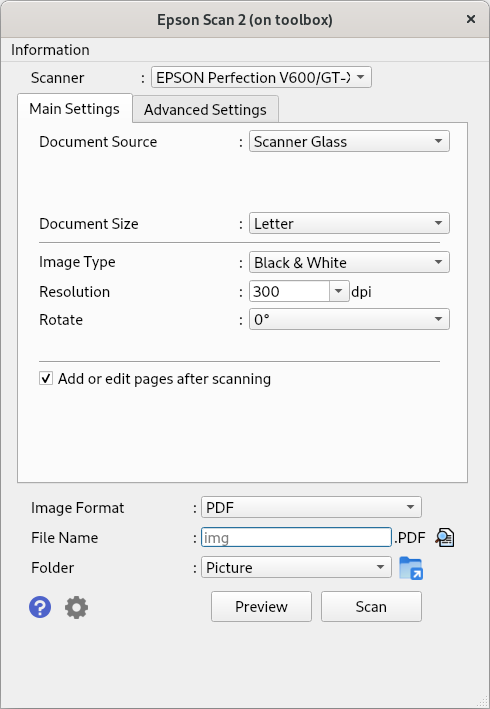
In practice, this application serves as a central control hub for your imaging workflow. Instead of relying on generic scanning tools that might miss device-specific features, this software provides a tailored graphical user interface (GUI) designed specifically for Epson devices. Users can easily adjust scanning resolutions, color modes, and document sizes before capturing an image. Once configured, the application allows you to save your digitized documents and photos directly into various popular file formats, making it easy to archive papers or import graphics into design projects.
Versatile Connectivity and Command Line Control
Modern office setups require flexible connectivity, and this utility delivers on that front. Whether your hardware is sitting right next to your computer or located across the office, the software adapts to your infrastructure:
- Local USB Connection: Ideal for desktop setups requiring fast, direct document scanning.
- Network Integration: Supports network-capable scanners, allowing multiple users on the same network to access the hardware.
- Command Line Interface (CLI): Advanced users and system administrators can control scanning operations via the terminal. This is incredibly useful for automating repetitive tasks or integrating scanning into custom shell scripts.
Understanding the Licensing and Build Details
While the front-end application itself is distributed as Free Software, it is important to note that the underlying scanner drivers contain proprietary components required to communicate with the physical hardware. Additionally, this specific Linux build is provided "as is" and is not directly supported by Seiko Epson Corporation. Despite this, it remains a highly reliable choice for Linux users seeking official compatibility with their Epson hardware.
Is It Right For You?
If you own an Epson scanner or multifunction printer and operate within a Linux environment, this tool is an essential addition to your utility belt. It offers the precise control needed for high-quality document preservation and design preparation. To explore this software further and add it to your system, head over to the official Flathub store page to get started.